
Toolbar
 Search questions
using filters
 |
Clear filters |
 |
New document |
 |
Open document |
 |
Save |
 |
Edit document |
 |
|
 |
Maximise screen |
 |
Specialist Library |
 |
Log out |
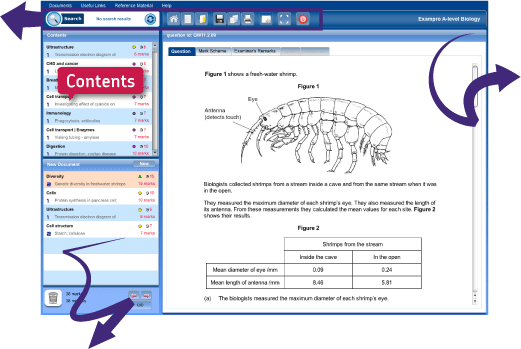
New Document
 Drag a question to the bin to remove it Drag a question to the bin to remove itfrom your document. |
 Click on New to start a new document. Click on New to start a new document. |
 Click the arrows to expand the windows and reveal more information. Click the arrows to expand the windows and reveal more information. |
 Click on QID Click on QIDto reveal the question codes. |
Viewer
The Viewer displays the question highlighted in the Contents Window or New Document Window. See all the related material by clicking on the tabs:
 |
 |
 |
 |
 |
Get the most out of Exampro in just three simple steps.
Step 1
Search for questions
Click on 'Search' in the top left-hand corner and filter by Topic, Specification, Unit, Level, Content, Question Type, or other categories relevant to the subject.
Step 2
Create your document
Click on 'Search' in the top left-hand corner and filter by Topic, Specification, Unit, Level, Content, Question Type, or other categories relevant to the subject.
Step 3
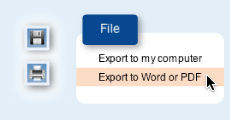
Use your document
Save and print your document, or export it to Word or PDF.